SQL-Engineering-Handbook
01 — Introduction to NULLs
Introduction
Before you can clean data, you need to understand what “missing” actually means to SQL. NULL is the single most misunderstood concept in the language — not because it’s complicated syntactically, but because it doesn’t behave like a normal value. This chapter builds the mental model everything else in this module depends on.
Concept Overview
NULL represents the absence of a known value. It is not zero. It is not an empty string. It is not “false.” It means: this value is unknown, not applicable, or not yet recorded.
Because of this, NULL does not participate in equality comparisons the way ordinary values do. Any comparison involving NULL — =, <>, <, > — evaluates to unknown, not true or false. This is the root cause of nearly every NULL-related bug you will encounter in production SQL.
Why This Exists
Relational databases needed a way to represent “we don’t have this information” without inventing a fake sentinel value (like -1 for a missing age, or '1900-01-01' for a missing date) that could be confused with a real one. NULL solves this cleanly at the type-system level — a NULL integer is still recognizably absent, unlike a 0 that might genuinely mean zero.
Business Context
A customer signup form with an optional “referral source” field. A legacy system migration where half the records never had a phone number captured. An employee table where the CEO has no manager. A sales order where the discount code field simply doesn’t apply. In every one of these cases, NULL is not an error — it’s the correct representation of missing information, if your queries handle it correctly.
Real Company Examples
- E-commerce:
orders.coupon_codeis NULL for the majority of orders because most customers don’t use a coupon — this is expected, not dirty data. - HR systems:
employees.manager_idis NULL for exactly one row — the top of the org chart. - SaaS billing:
subscriptions.cancelled_atis NULL for every active subscription, and only populated on cancellation. This is a common and powerful NULL pattern — NULL literally means “still active.”
Business Problems Solved
Understanding NULL correctly lets you answer questions like “how many customers have never placed an order,” “which employees have no assigned manager,” and “what percentage of records are missing key fields” — all of which are common data quality and reporting requirements.
Visual Explanation
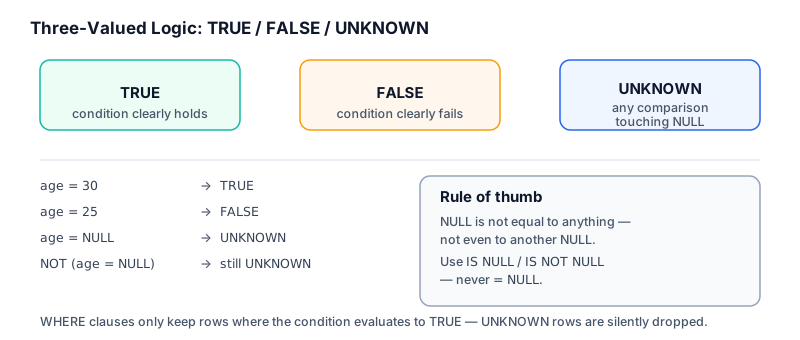
Three-Valued Logic in SQL
──────────────────────────
TRUE     FALSE     UNKNOWN (NULL)
  │         │            │
  │         │            └── comparisons involving NULL
  │         │
  │         └── condition evaluates, is false
  │
  └── condition evaluates, is true

WHERE clause keeps a row only when the condition is TRUE.
Rows where the condition is UNKNOWN are silently excluded —
same as FALSE, but for a different reason.
column_value = NULL        →  UNKNOWN   (never TRUE, even if column_value is NULL)
column_value IS NULL       →  TRUE / FALSE   (correct way to check)
NULL = NULL                →  UNKNOWN   (not TRUE — two unknowns aren't provably equal)
Syntax
-- Correct
SELECT * FROM customers WHERE phone IS NULL;
SELECT * FROM customers WHERE phone IS NOT NULL;

-- Incorrect — will never return rows, even where phone actually is NULL
SELECT * FROM customers WHERE phone = NULL;
Detailed Explanation
IS NULL and IS NOT NULL are special predicates — not operators — built specifically because = cannot express “unknown.” When SQL evaluates phone = NULL, it isn’t comparing “phone” to “no value”; it’s asking “is this unknown value equal to this other unknown value?” The only honest answer is “we don’t know,” which SQL represents as UNKNOWN, and WHERE treats UNKNOWN as “exclude this row.”
This same logic applies inside CASE, HAVING, JOIN ... ON, and boolean expressions generally. Anywhere you’d normally reach for =, <>, or a boolean check against a nullable column, ask whether NULL needs its own explicit branch.
Production Workflow
- Profile new tables for NULL rates on key columns before writing business logic against them
- Decide, per column, what NULL means in that context (missing vs. not-applicable vs. not-yet-happened)
- Write
IS NULL/IS NOT NULLchecks explicitly wherever NULL matters to the result - Never rely on default engine behavior silently “doing the right thing” with NULL in aggregates or joins — verify it
Engineering Considerations
- NULL affects
JOINresults: a NULL foreign key will never match in anINNER JOIN, silently dropping the row - NULL affects
GROUP BY: most engines group all NULLs into a single group, which is usually correct but should be intentional, not accidental - NULL affects sorting:
ORDER BYplaces NULLs first or last depending on the engine (MySQL: NULLs sort first inASC; PostgreSQL: NULLs sort last inASCby default) — always verify with your target engine
Performance Notes
IS NULL and IS NOT NULL can use a B-tree index in MySQL (InnoDB does index NULL values), so filtering on them is typically efficient. However, applying a function to a nullable column before filtering (e.g., COALESCE(phone, '') = '') usually prevents index usage — filter on the raw column with IS NULL instead whenever possible.
Common Mistakes
- Writing
WHERE column = NULLinstead ofWHERE column IS NULL - Assuming
NOT INwith a subquery that contains NULLs behaves likeNOT EXISTS— it does not; a single NULL in the subquery result set can make the entireNOT INreturn no rows - Assuming an
INNER JOINon a nullable foreign key will include unmatched rows — it won’t; useLEFT JOINwhen that matters
Edge Cases
NULL = NULLis UNKNOWN, not TRUE — useIS NULLfor both sides, or<=>(MySQL’s NULL-safe equality operator) when comparing two potentially-null columns- Empty string (
'') and NULL are different values in most engines (Oracle is the well-known exception, where empty string is treated as NULL) — never assume they’re interchangeable WHERE NOT (condition)whereconditioninvolves NULL does not simply invert the result set the way it would with pure TRUE/FALSE logic
Best Practices
- Always use
IS NULL/IS NOT NULL, never=or<>, when checking for NULL - Be explicit about what NULL means for each column in documentation — don’t leave it to reader inference
- Prefer
LEFT JOIN ... WHERE right.key IS NULLfor “find rows with no match” queries overNOT IN, which breaks silently in the presence of NULLs
Interview Questions
- Why does
WHERE column = NULLreturn zero rows even when the column contains NULL values? - What happens when a NULL value is included in the subquery of a
NOT INclause? - Explain three-valued logic in SQL and how it differs from boolean logic in a general-purpose programming language.
- How does an
INNER JOINbehave differently from aLEFT JOINwhen the join column contains NULLs?
Summary
NULL is not a value — it’s the absence of one, and SQL’s three-valued logic (TRUE / FALSE / UNKNOWN) exists specifically to represent that. Every NULL-related bug in production SQL traces back to treating NULL like an ordinary value instead of respecting this distinction. IS NULL and IS NOT NULL are the only correct tools for checking it directly.
Practice Challenges
- Write a query to find all customers with no phone number on file.
- Write a query to find all employees who report to someone (i.e., have a non-null manager).
- Explain, without running it, what
SELECT * FROM orders WHERE discount_code <> 'SAVE10'will return for rows wherediscount_codeis NULL — then verify your answer by running it. - Rewrite a
NOT INsubquery query into an equivalent, NULL-safeNOT EXISTSquery.