SQL-Engineering-Handbook
LIMIT
Definition
LIMIT restricts the number of rows a query returns. It’s applied after every other clause — FROM, WHERE, GROUP BY, HAVING, SELECT, and ORDER BY all run first, and LIMIT simply truncates the final result set.
Syntax
SELECT *
FROM table_name
LIMIT 5;
Pagination with OFFSET — skip the first N rows, then return the next M:
SELECT *
FROM table_name
LIMIT 5 OFFSET 10;
Visual Explanation
LIMIT is the last stage of logical execution order — everything else has already run by the time it truncates the result set.
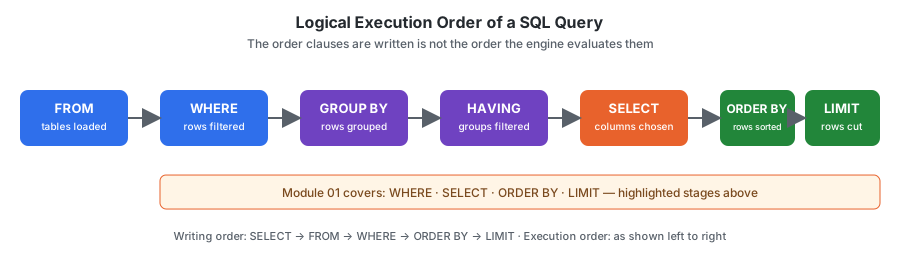
flowchart LR
    A[ORDER BY: rows sorted] --> B[LIMIT: keep first N]
    B --> C[Result Set]
    style B fill:#e8622c,color:#ffffff
Dialect Differences
LIMIT is the least portable clause covered in this entire module — it’s a MySQL/PostgreSQL extension, not part of the ANSI SQL standard. Writing pagination logic that needs to run on more than one engine means knowing all four of these:
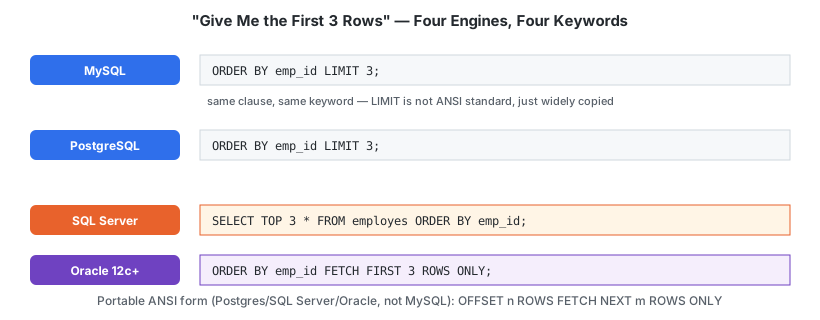
| Engine | “First 3 rows” | “Skip 2, take 3” (pagination) |
|---|---|---|
| MySQL | LIMIT 3 |
LIMIT 3 OFFSET 2 |
| PostgreSQL | LIMIT 3 |
LIMIT 3 OFFSET 2 |
| SQL Server | SELECT TOP 3 * FROM employes ORDER BY emp_id; |
ORDER BY emp_id OFFSET 2 ROWS FETCH NEXT 3 ROWS ONLY |
| Oracle (12c+) | FETCH FIRST 3 ROWS ONLY |
OFFSET 2 ROWS FETCH NEXT 3 ROWS ONLY |
| Oracle (legacy, pre-12c) | WHERE ROWNUM <= 3 |
Nested subquery with ROWNUM — no direct OFFSET equivalent |
The ANSI-standard, portable form — supported by PostgreSQL, SQL Server, and modern Oracle, though not by MySQL — is:
SELECT *
FROM employes
ORDER BY emp_id
OFFSET 2 ROWS
FETCH NEXT 3 ROWS ONLY;
If a query needs to run unmodified across engines, this is the form to reach for instead of LIMIT.
Schema Used
employes
| Column | Description |
|---|---|
| emp_id | Employee ID |
| emp_name | Employee Name |
| dept_id | Department ID |
| manager_id | Reporting Manager |
Sample Data
| emp_id | emp_name | dept_id | manager_id |
|---|---|---|---|
| 1 | Ammar | 1 | 3 |
| 2 | Riya | 2 | 3 |
| 3 | Sahil | 1 | NULL |
| 4 | Priya | 3 | 2 |
| 5 | Arjun | 2 | 1 |
Examples
Example 1: Return only the first 3 rows
SELECT *
FROM employes
LIMIT 3;
Without ORDER BY, which 3 rows come back is not guaranteed — see Common Mistakes.
Example 2: Top-N — highest employee IDs first
SELECT *
FROM employes
ORDER BY emp_id DESC
LIMIT 3;
Example 3: Pagination — page 2, 2 rows per page
SELECT *
FROM employes
ORDER BY emp_id
LIMIT 2 OFFSET 2;
Page 1 is LIMIT 2 OFFSET 0, page 2 is LIMIT 2 OFFSET 2, page 3 is LIMIT 2 OFFSET 4, and so on.
Business Use Cases
- Top 10 highest-spending customers
- First 5 most recent orders on a dashboard
- Paginated results for an API or admin panel
- Sampling a large table during data exploration
Execution Order
SQL executes queries in this order:
- FROM
- WHERE
- GROUP BY
- HAVING
- SELECT
- ORDER BY
- LIMIT
LIMIT runs last — it truncates whatever the fully sorted, filtered result set looks like at that point.
Common Mistakes
Mistake 1: LIMIT does not sort data
LIMIT only cuts off rows — it has no opinion on which rows come first unless you tell it via ORDER BY.
❌ Wrong — “first 3” is undefined without a sort
SELECT *
FROM employes
LIMIT 3;
✅ Correct — deterministic “top 3”
SELECT *
FROM employes
ORDER BY emp_id
LIMIT 3;
Mistake 2: Writing LIMIT before ORDER BY
❌ Wrong — syntax error in MySQL
SELECT *
FROM employes
LIMIT 3
ORDER BY emp_name;
✅ Correct
SELECT *
FROM employes
ORDER BY emp_name
LIMIT 3;
Edge Cases
LIMITlarger than the table —LIMIT 1000against a 5-row table returns all 5 rows silently; it’s not an error to ask for more rows than exist.LIMIT 0— returns zero rows, but the query still runs (useful in application code to validate query syntax/columns without transferring data).OFFSETpast the end of the data —LIMIT 3 OFFSET 100against a 5-row table returns an empty result set, not an error.
Interview Tip
Interviewers often ask: “Write a query to find the 2nd highest salary.” The naive answer reaches for LIMIT 1 OFFSET 1 after sorting descending — which works, but breaks silently on duplicate values (two employees tied for highest salary push the “2nd highest” down incorrectly). Knowing when LIMIT/OFFSET is the right tool versus when you need DENSE_RANK() (covered in the window functions module) is what separates a syntax-level answer from an engineering-level one.
Practice Questions
Easy
- Return the first 3 employees (by
emp_id, ascending). - Return the 2 employees with the highest
emp_id. - Return the first 2 departments.
Intermediate
- Return employees 3 and 4 when sorted alphabetically by name (i.e. skip the first 2).
- Design a pagination query returning page 3 of a 2-row-per-page employee listing.
Advanced
- Explain why
LIMITwithoutORDER BYis considered non-deterministic, and what could cause the same query to return different rows on different runs.
Related Topics
- SELECT
- ORDER BY
- WHERE
- OFFSET
Further Reading
GLOSSARY.md— “deterministic,” “pagination,” “ANSI SQL” definitionsFAQ.md— “do I needORDER BYbefore I can useLIMIT?”INTERVIEW_PREP.md— see “IsLIMITpart of the ANSI SQL standard?” and “2nd highest salary”